Showing posts with label Blogging Basic Tips. Show all posts

Tuesday, February 28, 2012

Add CSS codes into your blogger blog easily

add css code easily in blogger blog
How to Add CSS codes to your blogger Blog easily.
Sometimes you may want to add CSS codes to your blog for styling blog elements or blog widgets,Many of us adding CSS code by going to Edit HTML and add codes before ]]> and save template, Using this method by mistake  if any of the content in it deleted ,it my goes to your Template Crash.So there is a secure and alternate way to add CSS code as follows   .Here is a simple way to add CSS codes.


  •  Go to Design-> Template Designer (as shown in the figure)
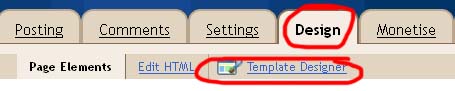
add css codes in blogger easy way
  •  Template Designer will open
  • Select Advanced -> Add CSS
  •  Place the CSS codes in the Text area.
  • Then you can see preview by clicking preview.
  • Save by click on Apply to Blog

Thursday, January 26, 2012

Use Search Bar to Find a code in Blogger

find code in blogger
This article is very useful for Blogger beginners.This is a tutorial about how to find specific code in  webPages/Blogs/Websites.You may see many Blogger Tutorials on internet for the purpose of designing or to add gadgets to your blog,for eg: if you need to add some meta tags  inside section.
 You go to
Design->Edit HTML
look for

find and place meta tags inside it. But,

It is not easy to find a code manually.So Use Ctrl + F to find.

Look the below picture
 

  • Hold Ctrl on the keyboard and press F,(Ctrl+F is the shortcut to reach Find Bar in almost all browsers)
  • A Find Bar will display, Type the code you want to search.
  • At once that code will highlight on the Page/Blog
  • Then you can edit/delete/modify highlighted code.
Please Leave Comments

Sunday, January 22, 2012

How to Backup/restore Blogger template


backup blog

This article is for absolute blogger beginners,about how to backup your blogger blog's template.This is very important thing that every blogger should beware of it. While adding or changing new features to your blog ,there may occur template crash.If you are not aware of this thing( backup template), it will affect your blogger blog's overall body language.So first you must know about backup your Blogger Blog Template.Follow the Steps 


Backup Blogger Blog template

It is a simple method to backup your template,follow the steps.
  • First Make sure you had Sign In your blogger account
  • Go to Design->Edit HTML
  • There is a link "Download Full Template" at right side,click it

  •  Save it,You finished..!
The file you downloaded now is in the .XML format,so if any crash made on your template you just upload the downloaded XML file.

Upload/Restore Blogger Template

If any problem persist to your blogger blog's template upload the XML file.
  • Select Design->Edit HTML
  • There is a button (Browse) below the "Download Full template" link.Click on Browse
  • Choose the XML file you downloaded
  • Then Click on Upload button right to Browse button.
You are done,you had studied how to backup and restore your template.