Showing posts with label NOKIA TRICKS. Show all posts

Friday, December 9, 2011

How To Change Your Nokia Phone Font

 I like to share some font here that is already created by some one else. Thanks for the creator. And you can found this type of font all around internet for free.

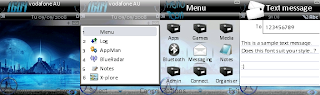

I have attached the two font and the font removal application to delete the font. Download all the 3 attachment and save it on your PC.
  1. CalibrEras.zip ( Font File)
  2. Corbel.zip (Font File)
  3. FontRemover.zip (Font Remover Application SIS apps for your Nokia mobile)
Before you are going to install the font make sure that you need the following application that help you to crack down your mobile:
  • You need to have X-plore on your mobile and the make sure that your system, hidden folders are enabled 
Extract the files inside the font zip folder to the following path C:\System\Fonts\ with the help of X-plore application.  Make sure that you have extracted all the three files inside the font zip, If you upload only the TTF file the font will not install on your mobile. Put all three files Font TTF file, FontRouter and Freetype. Once you done restart your mobile to change the fond effect. 

If you don't like the font you can easily delete the files using the FontRemover application.

Remember that you are extraction font into C:\System\Fonts\ EXACTLY

Note: If your mobile phone is running with Symbian (S60V2) operating system like ( N70 Series) you need to install the font folder might be  C:\Resource\Fonts\

dONT Forget To Share Us!!!

Saturday, November 26, 2011

How To Get Symbian Signed Account Easily

Hey

 You can create new account in Symbian Signed by clicking here!

Enter your Details and submit sometimes you can see an error "Your email address is black listed, please enter another email address"

 Don't worry you need to create a email id in IN.COM(create a username having 4 letters eg: abcd@in.com)

Now you can use this new email for your symbian signed account.

After Signing up you can add your mobile IMEI number and upload the sis(application file) and submit the uploaded file for signing.

you get an email with a link to download the signed application.  Done!

Like The Post

Nokia S60 Cool Applications For Free 2011

Fake Calls                         


Fake Calls is an application which with you can fake incoming phone calls, no actual call is made thus the calls are free of charge.

All parts of the application are using device themes, thus the Fake Calls Display also shows the native looking UI that uses the currently selected theme.

Also ringtones used with the Fake calls display are fetched from the device settings. If the contact selected for the Fake Call is having own ringtone, it will be used just as with native incoming call, and if it does not then the current profiles ringtone is used.

Also if the selected contact has an image or thumbnail picture, they will be shown in the Fake call Display.

Note that if you don't want to receive any actual calls while using the Fake calls, you can turn your device Offline, and if you do so, please add the Operator name & Fallback ringtone from the Settings, otherwise you will not have the operator name shown, as well as the ringtone will not be played.

Fake Calls version 1.12(0) (Unsigned)


Download the file, and go to Symbian signed to get it signed with open-signed on-line.

Fake Messages


Fake Messages is a fake message sending application that allows timed "sending" of fake SMS messages. SMS messages are handled inside the device, so no network connection is needed, thus sending fake SMS messages are completely free of charge..

Designed for S60 OS 9.1 Symbian smartphones, and tested only with Nokia S60 devices. This version should work with All S60 3rd & 5th edition devices, including Nokia 5800 and N97.

Fake Messages version 1.15(2) (Unsigned)


Download the file, and go to Symbian signed to get it signed with open-signed on-line.


Flash SMS Scheduler


FlashSMS Scheduler is a simple but effective SMS scheduling application, which with you can schedule outgoing SMS messages with timer, either to be sent once, or with different repeat options. The options also include sending normal SMS messages as well as Class 0 Flash SMS messages, thatare shown to teh receiver immidiately, and only stored into the inbox if the receiver clicks the save button.

Designed for S60 OS 9.1 Symbian smartphones, and tested only with Nokia S60 devices. This version should work with All S60 3rd & 5th edition devices, including Nokia 5800 and N97.
FlashSMS Scheduler version 1.15(2) (Unsigned)


Download the file, and go to Symbian signed to get it signed with open-signed on-line.
 

Note: All The Applications are unsigned you need to signed it before installing
           To Know More About Signing Click Here

Like The Post