Showing posts with label Internet Tricks. Show all posts

Sunday, March 25, 2012

14 Firefox come with a PDF viewer integrated

 14 Firefox come with a PDF viewer integrated 
14 Firefox seems to come with interesting news and the latest is presented which will have a PDF viewer integrated.

The reader will be based on integrated pdf.js, a library that can read PDF documents thanks to JavaScript and HTML5.

With the options of any PDF reader includes zooming, jump to a specific page, print and download.

Chrome was the first to incorporate this interesting feature that improves safety and comfort of the browser.

Friday, March 23, 2012

Unknown Google search tricks

Unknown Google search tricks
Google, is by far the most used search engine in the world and arguably the best. Normally we use the normal search without advanced options for this we have 2 options: press "Advanced Search" or use the simple search commands. In this guide I will explain what to serve and how to use.
Unknown Google search tricks


-Search for exact phrase: Normally our terms and Google searches by default, not have to be exactly the phrase (in the same order), but we can search for exact phrases by typing the word in quotes. Example: "Computer Shops"

-Find some of the words: If you want your search out at least one of the search terms using the OR command. Example: Computer Stores OR
-Excluding search words: You can tell Google to not appear in your search for a certain word. Example: Tents-The English Court


-Search by file type: If you want to search particular file type you can use the command filitype. Example: Computer Store filetype: PDF

Search by title-page: If you want to bring up the term in the title of the page use the allintitle command. Example: allintitle: Trickslove


-Search the text of the page: If what you want is that the term appears in the text of the page should use allintext. Example: allintext: trickslove

-Search by term in the URL: For the term appears in the URL of the page that you're using the allinurl command. Example: allinurl:trickslove.blogspot.com

-Search by date:
- & As_qdr = d5: to filter results of the last five days.
- & As_qdr = w5: for filtering result of the last five weeks.
- & As_qdr = m5: to filter results of the last five months.
- & As_qdr = y5: to filter results of the last five years.

They are interesting tricks to use an advanced search on Google quickly. They can be very useful. I hope you serve and you like it.
Tags:Unknown google tricks,new google tricks 2012,new google pranks,google tricks march 2012,trickslove google tricks,PC tricks,trickslove tricks,New 2012 google tricks

Thursday, March 22, 2012

Applications to Manage Gmail Desktop

Applications to Manage Gmail Desktop
The mail service Google has gradually positioned itself among Internet users is today one of the most used services of the company, personally I prefer Gmail over other email services, its simplicity, speed, large capacity and ease of use make it a great communication tool today. If you are one of the many users of this service you are sure to interest some of the following desktop applications to manage your email account in Gmail.

These applications can be of great value unless you are someone who keeps the browser open while working on your PC, or if you simply want to avoid falling into temptation as Facebook and Twitter , so you are aware of new messages and view your mail directly from your desktop.

To use this application is good to consider installing is not recommended on public computers, it is best to use them on our laptop, home PC or work to prevent anyone accessing our mail without permission. Now if we start with the applications.


Desktop is a client developed in Adobe AIR , which must be installed prior to implementation. The application connects you directly to your mailbox administres Gmail for it in much the same way that you're in the browser but with a much lighter appearance.

GeeMail works on Windows, Mac and Linux


With this application you can access your mailbox in addition to other services like Gmail calendar, contacts, or tasks. Its main advantage over other similar tools is that you can access multiple accounts open at the same time and in different windows.

This application is based on a browser with HTML5 support for its operation.


This utility lets you add multiple Gmail accounts and offers full functionality for working with your account: You can write, write, download attachments, etc.. Besides the above, its main advantage is that you can configure it to show you desktop notifications of Google Calendar, Google Docs, Reader Googl, Google +, Google News, and even Hotmail.
Tags:manage gmail,How to manage gmail dasktop,Manage gmail desktop,Manage gmail sevice,Gmail tricks,Manage gmail tricks,Trickslove internet tricks,PC tricks,Manage Gmail

Trick to browse the web without restictions

Trick to browse the web without restictions
UltraSurf is a practical sotware to access restricted websites. Thereby circumventing the censorship imposed by some countries when we surf the Internet and protects the privacy of our connection.
Trick to browse the web without restictions


It was originally created to help Internet users in China due to high levels of censorship in this country. Today we are told its creators have active users in over 180 countries
The program hides the IP, delete the browsing history, cookies, etc. to protect our privacy browsing and encrypted communications which can be highly recommended to use in public access to the network such as bars, stations, etc..
You can download it from here
Tags:browse internet without restrictions,Breowse web tricks,surf internet without restictions,Trickslove internet tricks,Surf web without any restrictions tricks,internet surf tricks,Trickslove tricks

Wednesday, March 21, 2012

Share your desktop Freely without having to install any application

Share your desktop  Freely without having to install any application
There are times when someone has a question about something. You take the time to explain how to do it but just do not understand what is happening. This is very common and no matter if someone is not smart, the reality is that if people do not see how it is done graphically, it is easy to understand, especially if we are talking about things that have to do with the computer .
Share your desktop  Freely without having to install any application

The simplest solution in such cases is to make a videocast or share your desktop live with others but usually to do this we install applications that allow either of two ways. Screenleap avoid all this trouble to download, install or register to share your desk, especially if you're in a hurry to do so.
The application process consists only of 6 passes through the browser and try to press a button to start sharing, allow to run the application (using Java), send the link to a friend, send the code as well (which is like a password) and start watching. Nothing more.

If you are the person who is looking only have a sample of what the other is doing, putting the code you have given and will be more or less like a video, which will download as fast or slow as you forbid your connection. If you are who you are sharing a frame will appear on your desktop showing the area where you have activity and the ability to move anywhere you want or need.
Weblink:http://www.screenleap.com/ 
Tags:Share desktop freely,free desktop share,Share desktop without any apllication,How to share desktop without any application,Trickslove internet tricks,PC tricks,Share desktop freely

Converts text into a picture to share

Converts text into a picture to share
Hi all. PinAQuote is a good way to solve this and it is a web application that converts any text into an attractive image. You can use it in two ways: either copy and paste on the main website you want to convert, or use the bookmarklet they have available, so anytime you're online and see something interesting you can share it immediately.


converts text into a picture to shareThe service was Pinterest thinking but you also have the options to share on other social networks and elsewhere if that's what you need. Also, there are two versions available for use: one for free where ever the design will be equally attractive, but you can not edit it, and the PRO which costs $ 1.99 where you can change things like colors and fonts.

The video above shows how it works, is quite simple. And it's a good idea for those who have little knowledge on how to create something from scratch.
Weblink :http://pinaquote.com/
Tags:Convert text to picture,convert picture to text,change text into image,Change text into photo,PC tricks,Trickslove tricks,Computer tricks,How to convert text into pic,How to convert pic into text

Monday, March 19, 2012

The most dangerous Internet worms

The most dangerous Internet worms
Hi all. For those who constantly surf the Internet we know we are exposed to many risks that are difficult to combat, and each day we will highlight a little known worms that travel through the network infecting computers and making life a little more difficult than it already is.
The most dangerous Internet worms


Picking up some history we can highlight the first worm of Internet who became famous as Morris (by the name of its creator, Robert Tappan Morris) was born on November 2, 1988. His power was so harmful, that had the capacity to slow the computers to the point of leaving them unusable. Now after over 20 years of existence today worms are a family of malware that are transmitted with greater force on the Internet.

Based on this, Microsoft shared a list of the most dangerous worms currently circulating in the network and that can give headaches to more than one:


Conficker: One of the threats, according to some security firms, will talk about with greater intensity in the coming months. This worm devours users' personal information, seeks to attack those most vulnerable in security on the Web and key delivery of emails to his accomplices phishers.

Taterf: The main characteristics of this worm highlights its ability to harassment of users, especially when conducting electronic transactions. It also has the power to intercept passwords easy deduction.

For example, when a user uses his computer to access the Internet and perform banking transactions, then the software captures and sends information to the offender without the victim noticing. Daniel Castellanos, Vice Asobancaria economic, explained that "it is important for customers to conduct their financial transactions from computers that have updated protection measures such as antivirus, antispyware, personal firewall and security patches to avoid the risk of malicious software installation ending capturing their usernames and passwords. "

Frethog: Found in the category of password interception programs and monitoring tools. Also stalker users performing electronic transactions and, as Taterf, captures passwords considered easy deduction.

Reindeer: It's in the category of Trojan downloaders and installers of malware. Of its features include using a form of Chilean Network package, deceiving users with pictures of camouflage as security software.


Rimecud: A worm that threatens to users who enter without security to the bank accounts from an Internet cafe or public computer, and seeks to gain control of computers. Also, install new malware designed to send spam and continue the infection cycle.

Autorun: Take advantage of users sharing private information on websites that do not have good security. It is able to lock keyboards and screens. It is also considered one of the worms that produce more losses for the financial sector.

Hotbar: Your main weapon is seduction act to users in the emails. It has the ability to threaten those who do not download security updates, and attacks while 'puppet head' through malicious websites.

FakeSpyro: One type of worm that have gained more ground is that of the 'rogues' or fake security solutions. FakeSpyro is one of the most dangerous and continues the tradition of his class to simulate a virus that is able to clean all malware from a computer. After-installed voluntarily by the victim, he believes will better protect your computer, captures personal information and passwords.


Alureon: This Trojan has rootkit features (able to hide himself and other malware tools and even legitimate directories and user passwords to control the computer remotely).

Zwangi: It is considered, despite its short life of crime, one of the most highly dangerous worms. Mislead users, usurping identities and attacks quietly. This worm redirects URL typed in the address bar of your web browser to www.zwangi.com, which supposedly is a search engine. It also takes screenshots without permission.


Some recommendations for preventing and combating worms:

As far as possible not to use unauthorized software security and recognition, as this has become one of the most common methods of attackers to defraud their victims. Also known as 'rogue' or 'scareware' and is software that appears to be beneficial from a security standpoint, but actually generates erroneous or misleading alerts, and by winning the confidence of victims, you can easily damage .
Maintain updated anti-malware defenses (antivirus, antispyware, firewall, etc..) And keep informed about the latest developments in preparation techniques of malware, including social engineering.
Attackers use Web sites to conduct attacks using phishing (phishing) or to distribute malware. Malicious web sites generally seem completely legitimate and show no outward indications of his nature, even for users with some experience.
Do not enter the page of the banks through links or emails , and preferably always typing the web address.
Keeping your computer security mechanisms such as antivirus, antispyware, personal firewall and security patches according to your operating system.

Even that above all remember to be cautious when surfing the net, do not trust the world or web applications or unknown or suspicious, and especially seek to be well informed of all news and updates on the Internet.
Info by Rakhesh...  
Tags:dangerous internet warms list,most dangerous PC worm,most dangerous computer worm,powerful PC worm,Danger PC worm list,Trickslove worm list,Most dangerous PC worm in history,Dangerous PC worm list,PC worms ifections history,PC worms total list,internet worms,Trickslove internet tricks

Thousands of Backgrounds For Twitter

Thousands of Backgrounds For Twitter

Hi all. If, as many have your Twitter user and have not been able to give even the style that goes with your personality, here I want to share a secure web ue going to give thousands of reasons for them to find a design you like, and give a better look at your Twitter profile.
Thousands of Backgrounds For Twitter

In twitrbackgrounds.com can find a wealth of backgrounds for Twitter, grouped into categories more easily find our favorites, plus we have a preview of each fund for such details is applied.
Do not stay with the fund provided, and give your Twitter profile your own style.
www.twitterbackgrounds.com
Tags:How to change twiiter background,change twitter background,move old twiiter background to new,New twitter bac kground,Twitter background collections,twitter background changer,twitter background change tools,Twit background change,Trickslove twitter tricks,Internet tricks,Twitter theme change tricks

Sunday, March 18, 2012

Four ways to schedule your Twitter messages

Four ways to schedule your Twitter messages
There are certain times that we are without internet connection and we need t energy activity on Twitter, as well to solve this problem can be programmed messages using these four alternatives.

- HootSuite, programming for Twitter, Facebook, and more. We can schedule messages for both Twitter, to Facebook or LinkedIn, among other networks. But also allows us to add two RSS feeds, in its free version.


Four ways to schedule your Twitter messages3


 Timely, seeking the greatest impact for your message. This alternative allows you to schedule messages in hours in which they have a greater impact.

Four ways to schedule your Twitter messages2
- SocialOomph. We can program from the moment we are writing a message with a certain delay, one day, a few hours or weeks.

- Twaitter. The scheduling of messages we can do individually, we programmed a message once, or we programmed it to repeat a number of times, allowing the message repeated indefinitely or end the program after X publications.

Four ways to schedule your Twitter messages
Tags:ways to schedule twitter messages,how to schedule twitter message,possible ways to schedule twitter messages,twitter schedulers list,twitter message scheduler sevice list,ways to schedule twitter message,send twiitter message without online,schedule twitter messages, trickslove,twitter message tricks,tricks

Saturday, March 17, 2012

Download proXPN & Browse Anonymously with Encrypted Internet Connection

 Browse Anonymously with Encrypted Internet Connection
XPN Pro is a program that allows us to surf anonymously, update your Internet connection with a VPN encryption and protects all types of DSL connections, cable and 3G. To use it you just need to download the file and install it.
Download proXPN  & Browse Anonymously with Encrypted Internet Connection
Characteristics, one can:

see the websites you visit
appropriate passwords, credit card or bank account
intercept and spy on your email, instant messages, calls, or anything else
search your web history
find out where you live

Download free Windows and Mac Available for iPhone.
Download proXPN  & Browse Anonymously with Encrypted Internet Connection

Installation:

Download run and click on the "Do not have an account?" link to create a new account. Enter your email address and password of your choice. Then select the box license agreement and click "I agree - Create Account". Click "OK" to complete the registration process for the account in the program. Check email e-mail proXPN. Click on the link to activate your free account. Check your spam folder. Once you have clicked on the link in the email, your account must be active. Go ahead and click on the "Connect" to connect to proXPN.
Download proXPN  & Browse Anonymously with Encrypted Internet Connection 

Link: Pro XPN
Tags: How to browse internet anonymously,Browse internet without caught,Anonymous browsing tricks,Trickslove Browsing trick,Anonymously Browsing trick,Download pro XPN  and browse anonymously,Browse anonymous,Browse oppssit trick,Browse sites without caught, hidden browsetrickslove

Friday, March 16, 2012

Tips and Tricks for google chrome

Tips and Tricks for google chrome
There are many advantages that today offer different browsers, and Google Chrome has certainly gained considerable ground with their latest versions, so I want to share 30 tips  allow us to gain a little more skill to use the Google browser .
Tips and Tricks for google chrome
    Create shortcuts on your desktop, quick bar or start menu for some web applications like Gmail. It's easy, just go to Gmail.con and choose the top right corner of the option 'Create application shortcuts ... "and choose where we put the application. It's really handy with some tools like Google Calendars or Documents, but also works with other services such as Windows Live Hotmail.
Tips and Tricks for google chrome
    Control + Shift + N opens a window in incognito mode, which allows us to do it there does not appear in the history and cookies are deleted when we close the window.
Tips and Tricks for google chrome
    You can also directly open a link in incognito mode by pressing the right mouse button and selecting 'Open link in incognito window'. Alt + Home loads the homepage of Google Chrome, we are on the thumbnails to go with your most visited sites.

    Control + T opens a new tab. You can drag to change the order or just move out of the browser to have their own window.

    Control + Shift + T opens the last tab you've closed. Back to press the shortcut and open the above. Chrome remembers the last 10 tabs you closed.

    Jumps between the different tabs by pressing Ctrl + (number). On 9 takes you to the last of all.

    Control + Tab lets you go jumping in order between your open tabs.

    + Shift + Tab controls does the same but in reverse order.

    As in Firefox 3, you can drag a link to another tab to open there, or move it between two tabs to open in new tab between the two.

    To add a site to your list of favorites, just click on the star to the left of the address bar and choose the folder you want to save it.

    Control + B hides the bookmarks toolbar of Google Chrome. Click again and reappear.

    Right click or hold down the button 'go back' and the list of sites you've visited recently. "Show full history" at the bottom of the list opens a new tab with all browser activity.
Tips and Tricks for google chrome
    Control + H is a faster way to get the history.

    You can delete the history of some day down to the desired day and press on the right 'Delete history for this day.'

    Control + J brings the Downloads page.

    To delete an item from your download page right-click and select 'Delete'. Removed from the list but not the physical folder where you saved.

    Press Control + K or Ctrl + E to search from the address bar. Once the combined pressures will see a question mark and then we write simply what we find.

    Right at the top of your browser and select 'Task Manager' to see how much memory they are using each of the tabs and plugins. Select one and click 'End Process' to close it.

    Shift + Escape is a quicker way to get the 'Task Manager'.

    To see that s plugin installed you just type about plugins in the address bar.

    If you type the following commands in the address bar of Google Chrome will get the relevant information: about: stats, about: network, about: histograms, about: memory, about: cache, about: dns.

    You can also write about: crash to see how a broken tab, if you have not already done so.

    A hobby of three seconds: type about: internet (Windows XP)

    Edit any web page on the fly. Right click on the page, 'inspect element' and everything that we edit the HTML we will see applied at the time.

    To make Google Chrome your default browser, click on the Tools button (the wrench above right), select 'Options' and click on the tab' Basic 'button that says "Make Google Chrome my default browser' .

    To delete cookies must go to Tools -> Options -> Advanced. Scroll down to section 'Security' and click on 'Show Cookies'. Now you can wipe one by one or all at once.

    To erase other data such as history or cache again go to Tools and select 'Clear browsing data ..'

    If what you want is to eliminate the most visited sites of the home page of Google Chrome, simply delete the browsing history with the above method.
Tips and Tricks for google chrome
    The cleaning will also cause the suggestions do not appear previously visited site in the address bar.
Tags:Google chrome tricks,tips for chrome,Chrome tricks,Google chrome tricks,Google chrome tricks,Trickslove tricks,Google chrome tricks,2012 Google chrome tricks,New version google chrome tricks

Access your PC files from anywhere any browser

Access your PC files from anywhere any browser
Sometimes we are away from our computer and we urgently need documents that are only within that team. To help us obtain any information that we keep, appears tappin, an application that allows us to access our computer files from any internet connected device.
Access your PC files from anywhere any browser
Access PC files from outside
We forget our USB save any information you stayed at the office computer from home, in our laptop and we have no access to this from here. What to do to get it? Through tappin.

You must download the web page and install it on the computer where the files that you want to share. tappin allows access from any mobile device that has internet access and share these files without much trouble. Of course, you can access from another computer.
Access your PC files from anywhere any browser
This application works with any device or computer that has Internet access. It is compatible with Windows and Mac operating systems

Access your PC files from anywhere any browser
tappin connects securely and encrypts the data so that only we can access the information we have stored in our computer. To use the service tappin registration is required, you can do it for free.
Access your PC files from anywhere any browser
An easy way to share files between your PC and any mobile device and the computer of a friend, or to remotely access the office computer from home or from anywhere.
We Link: http://www.tappin.com/
Tags:remote access to PC from anywhere,Access Computer files from anywhere,take files from anywhere,Access PC files from anywhere,Trickslove tricks,PC tricks,Access files from internet,Access files from Internet from other browser,Access and share files from internet,Access files from internet site

Wednesday, March 14, 2012

Online free Image Editors and Free Photoshop style

Online free Image Editors Online and Free Photoshop style
Hi all. When we talk about image editing, it is common to come out to highlight the name of Photoshop, this being the tool of choice for professional and amateur design, and is rightly has come to occupy the places of choice with its power and amount of functions to edit. But what happens when we have this tool available to us, always good to have on hand some options that are not so far from the power of Photoshop and for that I want to share some today.

Web applications are a great help when we do not have many programs installed, or when our team does not have sufficient resources to run a so heavy and advanced software such as Photoshop, fortunately it is now very easy to find online tools that have little way inferior to their peers and desktop publishers including graphics have had tremendous growth.

Here are 5 excellent online publishers share with functions similar to those in Photoshop, and that will facilitate the task of editing when you most need it. To access them just click on the title of each.

1. Aviary Phoenix: 
 Online free Image Editors Online and Free Photoshop style Aviry phenoix
Online free Image Editors Online and Free Photoshop style poenix

It is a powerful online image editor. Lets you work with images from your computer or import them from a URL, your Flickr account, Facebook or Tumblr. It has everything you need to draw, retouch and correct images and photos, apply filters and separate each item with new layers. It also lets you store and share over the network, integrate it into your own website or limit their availability to your friends, but for this you must register.

2. Splashup: This online editor manages an interface similar to Photoshop but much more Lite, although it contains fundamental tool palette, colored panels and layer manager. With them you can tweak almost any fotografía.Además smoothly, Splashup also has a section on basic filters and effects with which you can apply difuminos, change of tone, coloring and many other things that come to mind.

3. CloudCanvas:
Online free Image Editors Online and Free Photoshop style
It is an online photo editor that supports both vector and bitmap. Its interface is similar to Photoshop, but your options are more limited, is programmed in HTML5, so you should install a modern browser that supports that language.

4. Pixlr
Online free Image Editors Online and Free Photoshop style
 It's a pretty powerful Web application that has nothing to envy to their desktop equivalents. Its interface is quite similar to Photoshop, which will be useful for those who work regularly with this office herramienta.Entre find support for selections, masks and layers, has specific effects such as HDR effects simulator, tilt-shift , kaleidoscope, cross processing and more.

5. Sumo Paint:
Online free Image Editors Online and Free Photoshop style sumo paint
Online free Image Editors Online and Free Photoshop style Sumo paint
 It is a versatile tool that perfectly mimics the interface of the great editors photo editor. In the panels and toolbars easily see all of its functions, and are not pocas.Una lot of brushes and shapes, many options, support for text and layers, as well as basic vector paths, including basic 3D support modifications.
Tags: Online free Image Editors Online and Free Photoshop style,Free online image editor,Free photo editor, Without photoshop,online photo editor,Free iage editing online tools,Trickslove tricks,Free online tricks

Monday, March 12, 2012

Tips to give a good web design to your web site

Tips to give a good web design to your web site 
By creating a website one of the key points to consider is web design, simply because this will largely depend on the success or failure of our website. To the above we must think as users and consider what we would find on the site depending on the purpose of it.
The web design of a site varies greatly depending on the market to which it points, not the same design an online store, a blog or a business site, so we must be clear about some considerations when developing our site, some of them the share is below.
Tips to give a good web design to your web site

1. First impressions are important: We must understand that everything comes through the eyes especially when it comes to design. The first impression given by our site decides if the visitor stays or leaves the page. Really a user who arrives first will not matter much if the information contained on the website is quality or not, if the web design is bad and uncomfortable to use probably would not want to spend much time there and ended up abandoning the web as soon as possible.
2. The page should load quickly: After the first impression we have the site load time, if we think a bit as users come to the conclusion that we do not want to wait more than 10 seconds to load a page. To the above we must ensure that our website has pictures not too heavy, not having too many scripts and much less hype.
3. Shows what you are looking for: Many people come to your site looking for something specific, not easily found if it is safer to go forward quickly. For example if someone searches for web design valence and coming to your page certainly expect to see content about different companies that offer this service in the city.
At this point also plays the act of offering quality content and that apart from the competition in order to add value to our visitors.
4. have a sophisticated, yet simple: We must ensure that the appearance of our site maintains a sober design and easy to access but which in turn denote professional touches that differentiate our other page. Proper use of colors, the location of the images and widgets are key points to consider.
5. Create a site map: When a page starts to become great is more complex query and many can become lost trying to find what they want, in this part is very important to develop a map of our site, where you can easily navigate between different categories and topics that contains the page.
Although this is very simple and summarized hope you find it helpful when trying to start a new website.
Tags:Tips for good web design,Web design new ideas,New web design ideas,Ideas for new site,New website idea,Web design tricks,New web design tricks,Trickslove tricks,Internet tricks,Tips for new site,Traffic for web design,good web design ideas, traffic for web design,trickslove wev design tricks


Friday, March 9, 2012

Unknown google tricks you should know

              Google tricks you should know

Hi all. Google search engine is undoubtedly the most influential, important and used on the Internet, and I'm sure most of us use it always, but often fail to see beyond the simple search and really talking about Google are many functions we have at our disposal and we do not see with the naked eye, but with this article they want to present.

The following will list some of the most important and used functions of Google to help us much in our daily tasks:
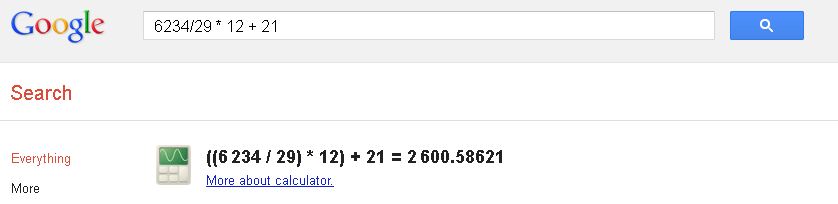
1. The calculator: This is one of the most used features in Google due to its speed and effectiveness, and saves time when making simple or complex operations. To use it you just have to write in the search box that need to solve the operation and press the Enter key:

example:6234/29 * 12 + 21

2. Weather: If you want to know the current climate of a city and the forecast for the next few days you just have to write to google as follows: city weather
Here is an example of output generated for the city where I live:
verification PZ7ZENQ6DXTN 
 3. Convert currency: Now if you want to know the value of change in your local currency of another country or vice versa, so you can do with help of Google , this is very simple, just enter the amount you want to convert to the currency want to make:
4. Convert measurement units very similar to the previous point, worse in this case we can do with units of measure:
5. The dictionary: Sure you've ever wanted to know what it means certain word, and here we have an extensive dictionary within reach. We just have to precede the expression defined: the word you want defined.
Tags: Unknown google tricks ,New google tricks,google tricks 2012,Google weather,google Calculator tricks,Google fun tricks,2012 google tricks,google new tricks,Trickslove tricks,Google tricks,PC tricks,Computer tricks,

15 Open Source applications for Windows

Hi all. It is common that people associate the open source Linux, but there are large numbers of robust applications, developed and maintained by a community of open source operating system for Windows.
In IslaBit we share some of the most important:
1. VLC : One of the most flexible media players available today. Supports a large number of audio and video formats including H.264, Ogg, DivX, TS, MPEG-2, MP3, MPEG-4 and AAC. But not limited to viewing multimedia files, but also can convert and encode formats.
2. Gnumeric : Spreadsheet of the GNOME Office suite. It has been extended for a long time and is now in a strong position in the world of spreadsheets. 520 currently has gnumeric functions, of which 154 are unique, one of the fastest spreadsheets of existing today. Gnumeric can read many formats of spreadsheets, but you're a clone of Excel, this is not indicated. 
3. Abiword : Also part of GNOME Office suite, and can serve all your word processing needs. With Abiword can create and edit text documents (whether Microsoft Office and OpenOffice), but also is fast, reliable and, as all applications of this list is completely free.
4. Audacity : A tool for recording and editing audio. You can use it to record live audio, convert analog to digital recording, cut, copy, add, change the speed and import / export in different formats. You can also delete and add noise effects.
5. Inkscape : It is a powerful vector graphics editor similar to Illustrator, Core Draw and Xara X. It adheres closely to the W3C standard file formats SVG, so you can be sure that any file created or edited with Inkscape SVG through, will work with any other compatible tool. One of the most important aspects of Inkscape is the availability of numerous tutorials found on their official website and other websites.
6. X-Chat 2 : One of the best IRC clients exist. Although many of the old IRC users have switched to using other instant messaging tools such as Messenger or GTalk, yet many consultants and IT managers continue as a valuable resource IRC network.
7. TurboCASH : A personal finance manager for Windows. He has been in constant development and maintenance for many years, so you have a good solid base and a large following, as many as over 100,000 companies in over 80 countries.
8. Amaya Web Browser : This is a web browser that aims to land on the planet as the W3C standard or simply as a different browser. It is not only an Internet browser, Amaya is also a Web editor, it may seem hard to believe, has been in operation since 1996 and is directly organized by the W3C.
9. ClamWin : Antivirus for Windows based on the venerable ClamAV for Linux. ClamWin offers all the standard features you may be used in an anti-malware tool and the integration of Outlook and Explorer. The only difference between ClamWin and competition is not using a real time scanner that is free. You also have to manually search if a file is infected, so it is not an antivirus lazy.
10. 7-Zip : Another great open source project able to compress and decompress all types of files, including ZIP, RAR, ACE, ARJ, also is fast, reliable and very intuitive. If you want a stock solution for compression and decompression of files, no doubt 7-Zip is the right tool.
11. PDFCreator : A tool for creating PDF files. It supports a wide range of options for Adobe PDF, including through password protection, encryption, 128 bit, and many others. Usage is simple, you just have to click the print icon and select the PDFCreator virtual printer, you'll instantly create a PDF file.    
12. TrueCrypt : An application to encrypt and hide in the computer data that the user deems reserved for it using different encryption algorithms such as AES, Serpent and Twofish or a combination thereof. Creates a virtual encrypted volume file in a timely and transparent fashion.
13. FileZilla : Application for FTP file transfer began as a project in a computer class in January 2001. Lets you transfer files from a local machine, to one or more FTP servers (and vice versa) with ease. And it uses HTTPS, SSH, and FTPS.
14. GIMP (GNU Image Manipulation Program) is a program for editing digital images as bitmap, both drawings and photographs. Fell within the GNU project and available under the GNU General Public License. It is also available in several languages ​​including: Spanish, Catalan, Galician and Euskera. Among its features include the use of layers, support for plug-ins, recognizes multiple image formats (PNG, JPEG, GIF, TIFF, MNG, BMP, PSD, and so on) and some vector graphics formats, as PostScript or SVG.
15. Thunderbird : An email client Mozilla Foundation. The application supports IMAP / POP, HTML mail, news, RSS, tags, built-in spell checker, supports extensions and skins, search engines, PGP encryption, a Bayesian spam filter and other features.
Tags: Open Source applications for Windows ,Tags: Open Source app for windows,Trickslove tricks,PC tricks,Computer tricks,Internet tricks,Windows software tricks,,Open Source applications for Windows
         

Converts Text to Speech Voice and Text

Converts Text to Speech Voice and Text
Always good to have on hand to facilitate practical applications of our activities. For example, did you ever needed to convert an audio text, convert text into voice or a website, audio or enter a web portal? Here is a collection of excellent options for converting text to speech or vice versa, each with different features and options.
The first, www.vozme.com , allows changing text to speech in multiple languages.. The program generates a text file with mp3 audio and you can download to your computer for free.
www.robovoice.com , can listen to web pages or ciberbitácoras. Usage is very simple: open the page you want to hear and ready, Robovoice will play the text you have on that page.
Blindspeak.com can send audio to any web site.
Dragon Dictation performs the reverse process, the voice recognition application allows you to create audio files and instantly email them, iPad, iPhone or iPod Touch.
With Pediaphon is possible to generate MP3 files, playlist or podcasts automatically from Wikipedia articles.
And finally spokentext.net , to convert voice files to pdf, plain text, PowerPoint, RSS feeds, emails and web pages.
 Tags:Converts Text to Speech Voice and Text,Text to voice,text to audio,word to voice,Internt tricks,Computer tricks,Trickslove tricks,PC tricks,Computer tricks,

Wednesday, March 7, 2012

Play Angry Birds Online

Hi all. Surely many of you have heard of a little game that is causing furor among users of iPhone or Android, and so also was the game's popularity has made their creators millionaires, and has even been inspired for the realization of a film, so many things that are heard of the famous Angry Bird s.
As unfortunately not all have the advantage of having an Apple product or an Android phone, and in view of the popularity that has made ​​this game, today I want to share a site where you can play online for free, we only have a good browser and some time and patience to entreternos.
The game itself has a very simple issue, we launch the birds and pigs against constructions that appear in each level, in order to destroy them all, as we go forward with more birds out new features and special tricks. Itself is a pretty entertaining game, hence the huge success it has achieved and that we can now better enjoy it all, so I leave the link here to have fun for a while.
The first load takes a while, but after doing very well loaded, plus the sounds and effects are excellent and make this game one of the best to hang out.

Play Angry Birds Online

Tags:Computer tricks,Angry Bird tricks,Online angry bird tricks,Internet tricks,Computer tricks,PC tricks,Trickslove tricks,Free angry bird tricks,Free game tricks 

How to use Twitter.

 Hi all. The social networks are now an essential tool for communication between people or businesses, and know it becomes necessary not to stay stuck with the news that offers Internet and new technologies, so today I want to explain how to use Twitter in only 8 steps.

What's going on?
On this simple question is based around the content posted on Twitter , but the interesting thing is that you answer using at most 140 characters. Therefore, this new type of communication is also known as microblogging or nanoblogging. Now to use it, just simply follow these easy steps:
1. Register: Go to www.twitter.com , create an address with the user name you want: www.twitter.com / yourusername.
2. Hello world!. Come in and write your first message or tweet with a maximum of 140 characters.
3. Go on and let me continue. Become a follower of your friends, the media that interest you, museums, blogs, artists ... Use the search engine to find them. You can begin to follow us: twitter.com / anandtnptc
4. Conversa. To send a public message sent to a particular person uses sign (@) followed by the name of the user which you want to write.
5. Retweet. Interesting information you reached your Timeline (It's like your Wall on Twitter)? Click Retweet (RT) and share it.
6. # Label. Please note that sometimes, to group microposts that covering the same subject, using a keyword, tag or hashtag preceded by the symbol #. Some are linked to current events ( # iranelection ) and others are maintained over time ( # yoconfieso ).
7. Create lists. The lists of Twitter is a tool for organizing the users you follow into groups (friends, work, news ...) or by subject (science, culture, sports, music ...). You can also follow other lists.
8. Carry it with you. You can write and read messages from others via the web Twitter or using an application like TweetDeck for PC and Mac If you want to send messages from the mobile phone, go into your Twitter page, click 'Settings', go to 'Devices' and add your phone number.
With these 8 simple steps and you can begin to interact with over 200 million users who use Twitter , and know the potential of one of the most powerful communication tools of the moment.
Tags:Twitter tricks,PC tricks,Computer tricks,Internet tricks,Trickslove tricks, Facebook twitter tricks,Internet tricks,Computer tricks,How to use twitter tricks

Monday, March 5, 2012

10 Tips for Safe Internet Surfing

 Surfing I found this information and it seemed a good idea to make them accessible for safer internet surfing.
 On the occasion of Internet Day celebrated worldwide on May 17, it is necessary to consider these "10 tips for navigating the Internet safely" and avoid being victims of Viruses, Fraud, Hackers, Crackers, Malware and other threats network.
 "
  1. Avoid suspicious links: One of the most used to direct victims to malicious sites are hyperlinks or links. Avoid clicking on them prevents access to websites that have threatened to infect the user. Links may be present in an email, a chat or a message on a social network: the key is to analyze if offered in a suspicious situation (an invitation to view a photo in a language other than their own, for example ), come from an unknown sender or forwarded to a website unreliable.
  2.  No access to objectionable Web sites: Through social engineering, many websites are often promoted with data that may alert the user - such as discounts on the purchase of products (or even free offers), fruits or materials exclusive news, multimedia, etc.. It is recommended for safe navigation the user is aware of these messages and avoid accessing websites with these features.
  3.  Updating the operating system and applications: The user must keep updated with the latest security patches not just the operating system, but also the software installed on your system to prevent the spread of threats through vulnerability that has the system.
  4.  Download applications from the official websites: Many sites pretend to offer popular programs that are altered, modified or supplanted by versions that contain some type of malware and malicious code downloaded when the user installs the system. Therefore, it is recommended that when you do download applications ever since the official websites.
  5. Use technology security: antivirus, firewall and antispam applications represent the most important to protect the computer against the main threats that spread through the Internet. Using these technologies reduces the risk and exposure to threats.
  6.  Avoid entering personal information into forms : When the user is faced with a web form fields containing sensitive information (eg username and password), you should verify the legitimacy of the site. A good strategy is to verify the domain and using the HTTPS protocol to ensure confidentiality of information. Thus, it may prevent phishing attacks that try to obtain sensitive information via the simulation of a trusted entity.
  7.  Use caution with the results generated by search engines: Through techniques of Black Hat SEO , attackers tend to position their sites ranked among the top positions on search engine results, especially in cases of keyword searches widely used by the public, such as current affairs, news extravagant or popular topics (eg, sports and sex). If any of these searches, the user must be aware of the results and verify what is being linked websites.
  8. Accept only known contacts: For both IM clients and social networks, you should accept and interact with known contacts only. This will prevent access to the profiles created by attackers to communicate with victims and exposed to various threats such as malware, phishing, cyberbullying or other.
  9.  Avoid suspicious executable files: The spread of malware is usually done through executable files. It is advisable to avoid the execution of files unless you know the safety of yourself and your reliable source (whether it comes from a contact to IM, email or a website). When downloading files from P2P networks, so it is suggested to analyze prior to its execution with a security solution.
  10. Use strong passwords: Many Internet services are protected with a password, so as to protect the privacy of information. If this password is simple or common (widely used among users), an attacker could guess and therefore to hack like the real user. For this reason we recommend the use of strong passwords, to different types of characters and a length of at least 8 characters.
 As always, good practices serve to increase the level of protection and are the best accompaniment for security technologies. Whereas the latter are responsible to prevent the likelihood of some type of incident, user education achieved this less exposed to threats, something that surely any reader will want to use the Internet daily.
 We take the day in question to celebrate with you the existence of the Internet, along with everyone from the place trying to make use of the technologies for better and safer experience.
Tags:Trickslove tricks,PC tricks,Computer tricks,Pc tricks,Internet tricks,safe browsing tricks,Internet tips