Twitter is a social networking sites popular in the world of bloggers to promote their blogs. So here I am very cool Twitter Blogger widget, now it shows me how to add flash buttons to your twitter blogs and websites. These are the widgets based on Flash animations and have some nice effects.These buttons can help Twitter Flash Spice up your blogs, Webssites and can help you gain more followers on Twitter. These are designed and developed by twitterflash.net. I'm taking all the 15 types of one-click install to your blog.

How to Install Flash Animated Twitter Follow Me Widget To Blogger / Blog / Websites
I have to write two set of instructions for each steps, as some of you are using the default layout, and some of you are using the new layout. So, let's see how to install this cool widget in your blog..
Step 1:
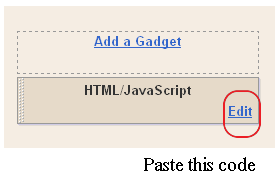
If you're using the old Blogger interface: Go to Dashboard - Design - Page Elements - Add a Gadget.
 Add a Gadget of HTML/JavaScript type.
 If you're using the new Blogger interface: Go to Dashboard - Layout - Add a Gadget
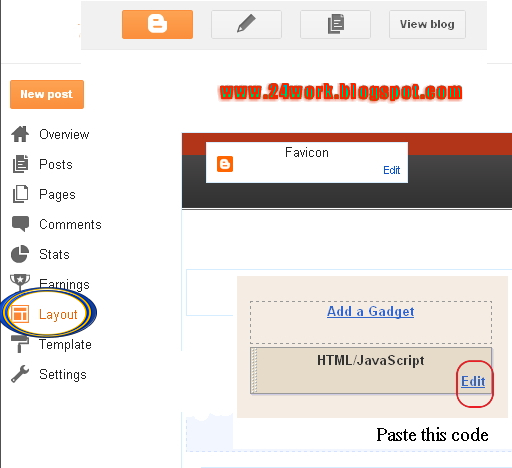 2.Click on 'Add a Gadget' on the sidebar.
3.Select 'HTML/Javascript' and add the one of code given below
4. Now Click On Save 'JavaScript' You are done.

And now click Save
1. Choose Any Flash Follow Me Button As You Want
2. Replace rohul786 With Your Twitter User Name
3. Customize Width And Height as You Need
4. Click on Generate Button and Finally Click on Add to Blogger Button to add this widget on your blog.
OR
5. Click on Get Code Button and Copy the code to use it.
How to Install Flash Animated Twitter Follow Me Widget To Blogger / Blog / Websites
I have to write two set of instructions for each steps, as some of you are using the default layout, and some of you are using the new layout. So, let's see how to install this cool widget in your blog..
Step 1:
If you're using the old Blogger interface: Go to Dashboard - Design - Page Elements - Add a Gadget.
3.Select 'HTML/Javascript' and add the one of code given below
4. Now Click On Save 'JavaScript' You are done.
And now click Save
How to Install Flash Twitter Follow Me Buttons on Your Blog?
1. Choose Any Flash Follow Me Button As You Want
2. Replace rohul786 With Your Twitter User Name
3. Customize Width And Height as You Need
4. Click on Generate Button and Finally Click on Add to Blogger Button to add this widget on your blog.
OR
5. Click on Get Code Button and Copy the code to use it.

